
The LangChain Ecosystem Demystified
DevLog: The LangChain Ecosystem Demystified — When to Use LangChain, LangGraph, LangSmith (and How They Stack Against Hermes)
If you've been building with LLMs for more than six months, you've almost certainly hit this wall: you start with LangChain, your workflow grows, you hear about LangGraph, you find LangSmith mentioned in a GitHub issue, and suddenly you're staring at four tools with "Lang" in the name wondering which one you actually need.
This post is a field guide. Not a beginner's explainer — a practitioner's map, with the real distinctions, the failure modes nobody puts in the README, and the hard lessons people have already paid for in production.
First: Why Do These Tools Exist at All?
Building with LLMs directly — raw API calls to OpenAI, Anthropic, whatever — is fine for a demo. It falls apart fast when:
- You need to chain multiple steps (retrieve context → summarize → respond)
- Your app needs to call external tools and act on results
- You need state across a conversation
- Something breaks and you have zero visibility into which step failed and why
- You want to prevent the model from going off-script in production
These tools exist because raw API calls don't give you any of that. They're scaffolding — some of it good, some of it overengineered — for building systems that actually hold up.
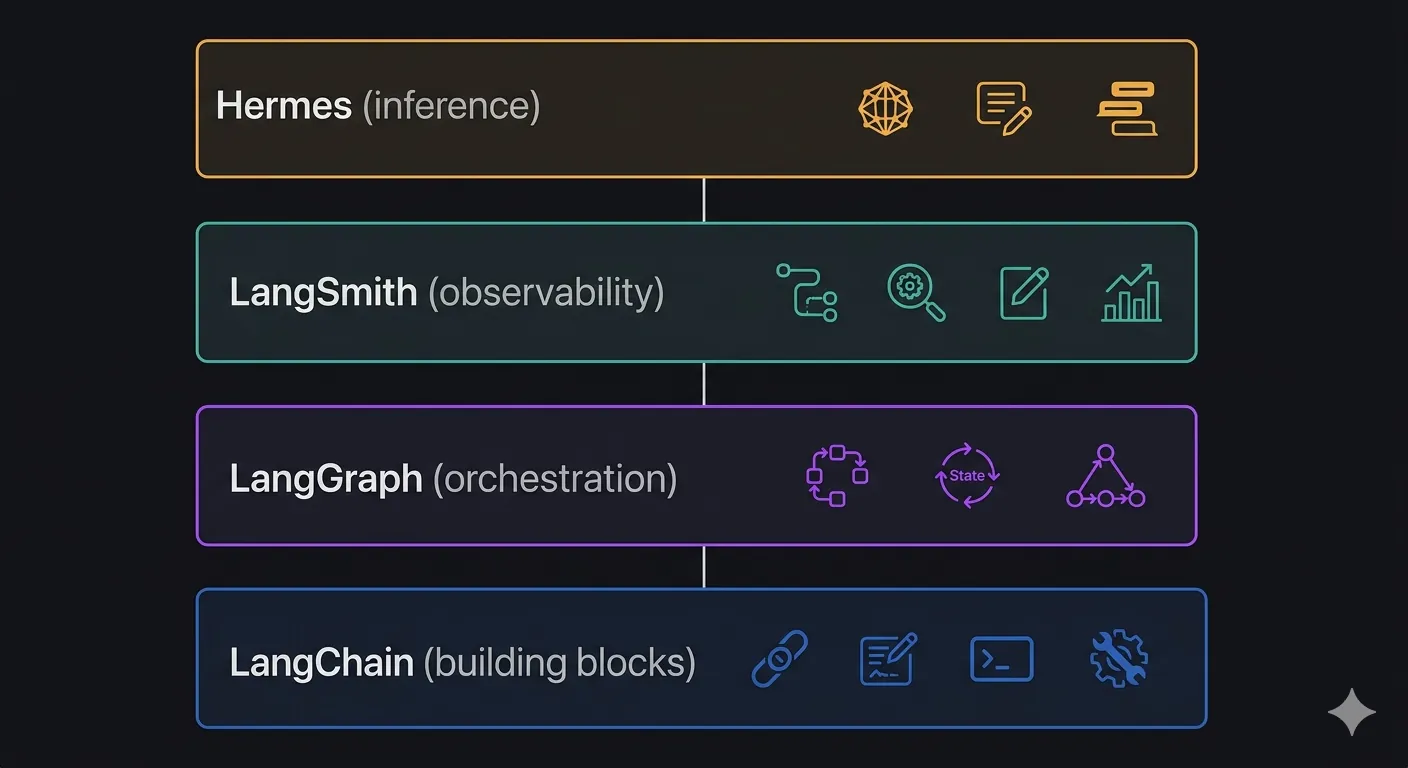
The Four Tools, Plain
Think of them as a stack, not alternatives:
| Tool | What it is | Analogy |
|---|---|---|
| LangChain | Modular building blocks for LLM pipelines | Express.js |
| LangGraph | Orchestrator for stateful, branching, multi-agent workflows | Redux + task graph |
| LangSmith | Observability, tracing, and evaluation platform | Datadog for your LLM |
| LangFlow | Visual drag-and-drop builder on top of LangChain | n8n / Zapier for AI |
LangFlow is out of scope for this post — it's a no-code interface, useful for demos and fast prototyping, but rarely the right answer for anything going to production.
LangChain: Start Here. Leave Eventually.
What it does well:
LangChain gives you composable primitives: chains, prompts, memory, document loaders, retrievers, output parsers, and tool-calling. The core abstraction — LCEL (LangChain Expression Language) — lets you wire these together declaratively.
chain = prompt | llm | output_parser
result = chain.invoke({"input": user_query})
Clean. Readable. Fast to build.
When to use it:
- Linear pipelines: load doc → chunk → embed → retrieve → generate
- RAG applications (retrieval-augmented generation)
- Rapid prototyping of agent-like behavior
- When you need a rich library of integrations (150+ LLM providers, 50+ vector stores)
The honest problems:
Here's what you won't read in the docs. According to a 2025 AI Developer Survey, 45% of developers who try LangChain never use it in production, and 23% who adopted it initially ended up removing it entirely.
Why?
1. Abstraction leaks under pressure. LangChain's higher-level abstractions — AgentExecutor, built-in memory classes — add latency and hide what's actually happening. Teams reported 1+ second overhead per API call from memory management alone. When you need to debug, you're reading source code you didn't write.
2. Default memory is expensive and dumb. Out of the box, LangChain stores the entire conversation history in every context window. Teams that tuned this down to only relevant recent turns reported ~30% cost reduction — but you have to know to do it.
3. Version whiplash. LangChain moved fast. LangChain 0.1 → 0.2 → 1.0 introduced breaking changes that forced full refactors. Teams that were on tight roadmaps got burned. The upgrade to 1.0 in particular required significant migration effort for complex apps.
4. Architectural lock-in. LangChain's dependency graph is heavy. Teams that needed to swap a component later — say, swap their vector store or move off a particular LLM provider — found themselves fighting tightly coupled abstractions instead of just changing a config.
The verdict: LangChain is a great place to start. The mistake is treating it as the permanent foundation of a production system.
LangGraph: When Your Workflow Has Opinions
LangGraph was LangChain's answer to the problem it helped create: once your agent needs to branch, loop, retry, or coordinate multiple sub-agents, a linear chain breaks down.
The core idea:
Your application is a directed graph. Nodes are functions (LLM calls, tool executions, Python logic). Edges are transitions — including conditional edges that route based on state.
graph = StateGraph(AgentState)
graph.add_node("planner", planner_node)
graph.add_node("executor", executor_node)
graph.add_node("reviewer", reviewer_node)
graph.add_conditional_edges("reviewer", route_based_on_quality)
What you actually get:
- Persistent state: checkpointing across steps, so a long-running workflow can resume after failure
- Human-in-the-loop: pause and wait for human approval before continuing
- Multi-agent coordination: supervisor patterns, subgraphs, parallel branches
- Middleware (v1.1+): retry with exponential backoff, content moderation, rate limiting built into the graph runtime
When to use LangGraph instead of LangChain:
| Scenario | Use |
|---|---|
| "Summarize this doc" | LangChain |
| "Research a topic, write a plan, execute steps, review output, loop if bad" | LangGraph |
| "Coordinate 3 specialized agents with shared state" | LangGraph |
| "The workflow might take 20 minutes and must survive a server restart" | LangGraph |
| "Need a human to approve before committing a database write" | LangGraph |
Who's actually using it in production:
LinkedIn, Uber, Replit, and Elastic have all publicly disclosed LangGraph usage. The pattern is consistent: complex multi-step automation where the model needs to take real actions with real consequences, and where failure modes have to be controlled carefully.
CyberArk's experience (published engineering blog): they built a production security agent using LangGraph specifically because they needed the model to pause, consult a human, and only proceed after explicit approval — something linear chains can't express cleanly.
The real pitfall with LangGraph:
It solves real problems but it's not magic. The most common failure pattern is graph design errors: teams that build overly complex graphs with too many nodes, unclear state schemas, and conditional edges that create infinite loops. The recommendation from practitioners is to start simple — two or three nodes max — and add complexity only when the simpler version demonstrably fails.
Also: LangGraph does not help you if your underlying LLM calls are flaky or expensive. The graph orchestration is solid; the model quality problem is still yours to solve.
LangSmith: The One You Skip Until You Regret It
What it does:
LangSmith is an observability and evaluation platform. It traces every LLM call, captures inputs/outputs/latency/cost, and lets you run evaluations — both offline (test datasets) and online (sampled production traffic).
It's framework-agnostic. You can use it with raw API calls, LangChain, LangGraph, CrewAI, or anything else.
# One env var and you're tracing everything
os.environ["LANGCHAIN_TRACING_V2"] = "true"
os.environ["LANGCHAIN_API_KEY"] = "your-key"
The "why didn't I add this from day one" moment:
Debugging non-deterministic LLM failures without tracing is guesswork. You get a bad output and you have no idea whether the prompt was malformed, the retrieval step returned garbage, the tool call failed silently, or the model just hallucinated. LangSmith gives you the full execution trace — every step, every intermediate result.
When to use LangSmith:
- From day one. Seriously. Add it before you have a problem, not after.
- When you're debugging outputs that are wrong but you don't know where in the chain they went wrong
- When you need to prove quality over time (regression testing as your prompts evolve)
- When you're in a regulated environment that needs audit logs of AI decision-making
Production lessons:
-
Don't trace everything at full verbosity in high-traffic production. Set sampling rates. Trace 100% in dev/staging, maybe 5-20% in prod depending on volume. Otherwise your LangSmith costs get out of hand.
-
Use online evals. Set up automated evaluators that run on sampled production traffic. This is the only way to detect quality drift before your users do.
-
LangSmith ≠ your only observability tool. It's great for LLM-specific traces. You still need your standard APM (Datadog, New Relic, whatever) for infrastructure-level metrics. They're complementary.
Hermes Multi-Agent: A Different Category
What Hermes is:
Hermes (specifically NousResearch's Hermes model family, often run via Ollama) isn't a framework in the same sense as LangChain or LangGraph. It's a fine-tuned LLM that's specifically trained for tool-calling and agentic behavior.
The key proposition: Hermes 3 8B running locally achieves 91% tool-call accuracy on an RTX 4090 — only 3 points behind LangGraph+GPT-4o. Zero per-token cost.
The actual distinction:
| LangChain / LangGraph | Hermes | |
|---|---|---|
| What it is | Framework / orchestrator | A model |
| Tool-calling | Via any model you wire in | Built into the model's fine-tuning |
| Deployment | API-based by default | Runs locally via Ollama |
| Cost model | Pay-per-token | Compute cost (your hardware) |
| Control | Full architectural control | Less workflow flexibility |
| Setup complexity | High | Lower for simple agent use cases |
They're not actually alternatives.
This is the nuance that most comparison posts miss: you can run Hermes inside LangGraph. LangGraph accepts Hermes 3 via the ChatOllama wrapper. The combination gives you LangGraph's orchestration and checkpointing with Hermes's local, private, cost-efficient inference.
from langchain_community.chat_models import ChatOllama
llm = ChatOllama(model="hermes3")
# Drop this into your LangGraph nodes
When Hermes makes sense:
- Data privacy requirements mean you can't send data to a cloud LLM provider
- Cost control at scale — high-volume workloads where token costs compound
- Tool-calling-heavy workloads where you want a model fine-tuned for exactly that task
- Local development without API rate limits
When LangGraph+GPT-4o still wins:
- Tasks requiring the most capable reasoning (Hermes 8B still lags frontier models on complex reasoning)
- Production deployments where you don't want to manage inference infrastructure
- When the 3-point accuracy gap matters (it often does in high-stakes workflows)
The Decision Map
Are you prototyping or building something simple and linear?
→ LangChain (LCEL chains, simple agents)

Does your workflow branch, loop, or coordinate multiple agents?
→ LangGraph (with LangChain for the building blocks)

Do you need to debug, evaluate, or monitor quality over time?
→ LangSmith (from day one, framework-agnostic)

Do you have privacy/cost constraints on inference and tool-calling?
→ Hermes 3 (via Ollama, can be integrated into LangGraph)

Do you want all of the above in production?
→ LangGraph + LangSmith + Hermes where appropriate

The Biggest Pitfalls (Real Stories)
"We built everything on LangChain abstractions and couldn't debug anything"
Multiple engineering teams have written post-mortems on this. The pattern: used high-level LangChain abstractions (AgentExecutor, built-in memory), shipped fast, hit a production failure, spent days reading LangChain source code to understand what the abstraction was doing under the hood. The lesson: use LangChain's integrations and primitives, but avoid building core logic inside abstractions you don't fully understand.
"LangGraph infinite loops at 3am"
A team building a research agent forgot to add a maximum iteration count to a self-correcting loop. The graph kept trying, retrying, and refining indefinitely. Each iteration cost API tokens. By morning: a very large API bill and no runaway stopping mechanism. Lesson: always set recursion_limit in LangGraph. Always.
"We added LangSmith too late"
A team deployed an agent to production, got quality complaints from users, and had no tracing. Spent two weeks trying to reproduce failures that were fundamentally non-deterministic. Adding LangSmith retroactively while the system was live was painful. Lesson: instrument first, build second.
"We migrated to LangChain 1.0 with two weeks of runway"
LangChain 1.0's API changes (deprecated modules, restructured imports, breaking changes to LCEL) caught teams who had built deeply integrated apps off guard. One team reported three weeks of migration work just before a product launch. Lesson: pin your LangChain version and plan upgrades deliberately, not reactively.
"Hermes was great until it wasn't"
A team chose Hermes 8B for a local, private agent. It worked well for structured tool-calling tasks. When the use case evolved to include more open-ended reasoning and multi-step planning, the quality gap from frontier models became visible and painful. They ended up building a hybrid — Hermes for tool calls, GPT-4o for planning. Not wrong, but not the simple solution they expected.
Bottom Line
The LangChain ecosystem is not one tool — it's a layered stack for different problems at different stages of maturity. Most production AI agent systems end up using more than one of these:
- LangChain for the building blocks
- LangGraph when workflows need to be stateful and controllable
- LangSmith as the eyes into what's actually happening
- Hermes as a model choice when privacy, cost, or tool-call specialization are priorities
The biggest trap isn't choosing the wrong tool. It's treating any of them as a complete solution to the hard problems — reliability, cost, quality, and control — that are inherently yours to solve.
These tools lower the floor on what it takes to build. They don't raise the ceiling on what's possible without careful engineering.
Thoughts? What have you shipped with these tools? Where did it go sideways? DMs open.
Sources:
- DataCamp: LangChain vs LangGraph vs LangSmith vs LangFlow
- Galileo: LangChain vs LangGraph vs LangSmith
- Production Pitfalls of LangChain Nobody Warns You About
- The Langchain Dilemma: An AI Engineer's Perspective
- Why 45% of Developers Never Use LangChain in Production
- Lessons Learned from Upgrading to LangChain 1.0
- Is LangGraph Used In Production? — LangChain Blog
- CyberArk: Building Production-Ready AI Agents with LangGraph
- Hermes Agent vs LangChain
- LangWatch: Best AI Agent Frameworks in 2025
- LangSmith Observability Docs
- Advanced LangSmith Tracing Techniques in 2025
Ian Xie
May 30, 2026
ian.us.ci