
Mastering OpenClaw on Telegram: Taming the Multi-Agent Chaos
Mastering OpenClaw on Telegram: Taming the Multi-Agent Chaos
If you’re building an automated solo-entrepreneur ecosystem with n8n and OpenClaw, you already know the endgame: multiple AI agents handling distinct roles (research, content creation, and analysis) while still behaving like professionals. Moving from private chats to a Telegram group architecture is the true scalability test. The challenge is getting collaboration without burning API credits or triggering bot-to-bot chaos loops. This note covers the mechanics, the require-mention tradeoff, and the configuration guardrails that make the setup usable.
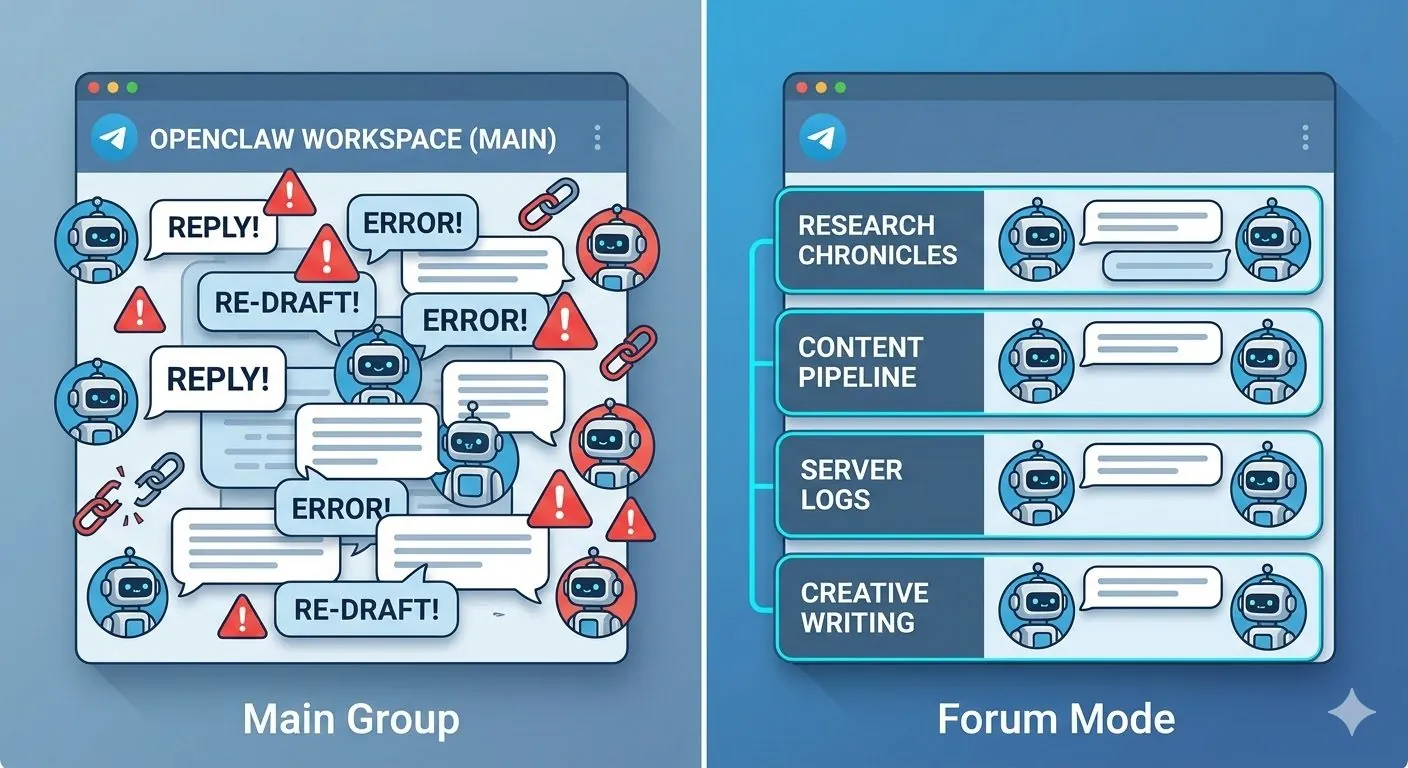
Main Group vs. Separate Topics (Forum Mode)
"Never attribute to AI that which can adequately be explained by incompetence — and incompetence is always a safer bet."
— London pub wisdom
Telegram allows you to run bots in a standard Main Group or within a Forum structure using Separate Topics. When orchestrating a multi-bot workspace, your architecture dictates your success.
| Architecture | Pros | Cons | Best For |
|---|---|---|---|
| Main Group Only | Linear, simple setup. All bots share a single, unified timeline of events. | High risk of context bleed. Hard to isolate specific workflows (e.g., debugging vs. brainstorming). | Small setups (1-2 bots) with strictly sequential tasks. |
| Separate Topics | Absolute context isolation. You can have a "Content Pipeline" topic, an "n8n Server Logs" topic, and a "General Chat" topic. | Requires stricter routing logic. Bots need explicit configuration to know which chatId / topic messageThreadId to listen to. | Complex, multi-agent automated content workflows. |
The Verdict: If you are running multiple specialized agents (e.g., pulling trend summaries via n8n and feeding them to an OpenClaw writer), Separate Topics are non-negotiable. It keeps your raw data feeds isolated from your creative drafting channels.
The "Require Mention" Dilemma (Privacy Mode)
When you add an OpenClaw instance to a Telegram group via BotFather, you must decide whether to enable Privacy Mode (which forces users to @mention the bot or use /commands for it to see the message).
-
Require Mention ON (Privacy Mode Enabled): The safe play. OpenClaw only wakes up and consumes tokens when explicitly called. The downside? You lose true autonomy. The bot can't spontaneously chime in on a workflow error or organically participate in a multi-bot debate.
-
Require Mention OFF (Privacy Mode Disabled): The "God Mode" approach. The bot sees every message in the group. This allows for incredibly fluid, autonomous interactions where OpenClaw can proactively fix errors logged by n8n.
The Rule of Thumb: Turn "Require Mention" OFF only if you are using Separate Topics. If you leave it off in a single Main Group, your bots will consume every single message as context, rapidly exploding your token costs.
Painful Lessons: Moving from Private to Group Chats
Moving a seamlessly working OpenClaw bot from a private direct message into a group chat introduces wild variables. Here are the experimental scars and real cases from that migration:
Case 1: The Infinite Bot-to-Bot Loop
I placed my OpenClaw content generator and a simple webhook notification bot in the same channel with Privacy Mode disabled. The webhook bot posted a trend update. OpenClaw responded with a drafted post. The webhook bot (poorly configured) replied with an "Error: Command not recognized" message. OpenClaw dutifully apologized and offered a new draft. This infinite apology-error loop burned through thousands of tokens in minutes.
Case 2: The Context Bleed
In a unified group, OpenClaw began answering questions I was asking a different bot. Because it was reading the entire chat history, its system prompt became diluted with irrelevant server logs and n8n webhook payloads, completely degrading the quality of its creative output.
Resolution & Out-of-the-Box Thinking
To fix these issues, you need to step away from default setups and enforce strict channel routing and system-level ignore rules.
1. Topic-Specific Routing via openclaw.json
You can restrict your OpenClaw instance to only listen and reply within specific Telegram topics by utilizing the channels configuration.
When you're deep in the config rabbit hole, you start to question why you didn't just pay someone $10 a month for a SaaS that does this. Then you remember you like rabbit holes. That's the problem, really.
{
  "channels": {
    "telegram": {
      "enabled": true,
      "botToken": "YOUR_BOT_TOKEN",
      "allowedChats": [
        "-1001234567890"
      ],
      "requireMention": false,
      "ignoreBots": true
    }
  }
}
2. The "n8n Arbiter" Strategy (Out of the Box)
Instead of letting OpenClaw bots talk directly to each other in Telegram, use n8n as the invisible arbiter.
-
Set up an n8n workflow that listens to Telegram webhooks.
-
When "Bot A" drops a payload into the group, n8n catches it, formats it, and uses the OpenClaw API to trigger "Bot B" privately.
-
"Bot B" then posts the final, refined output back to a designated Telegram Topic.
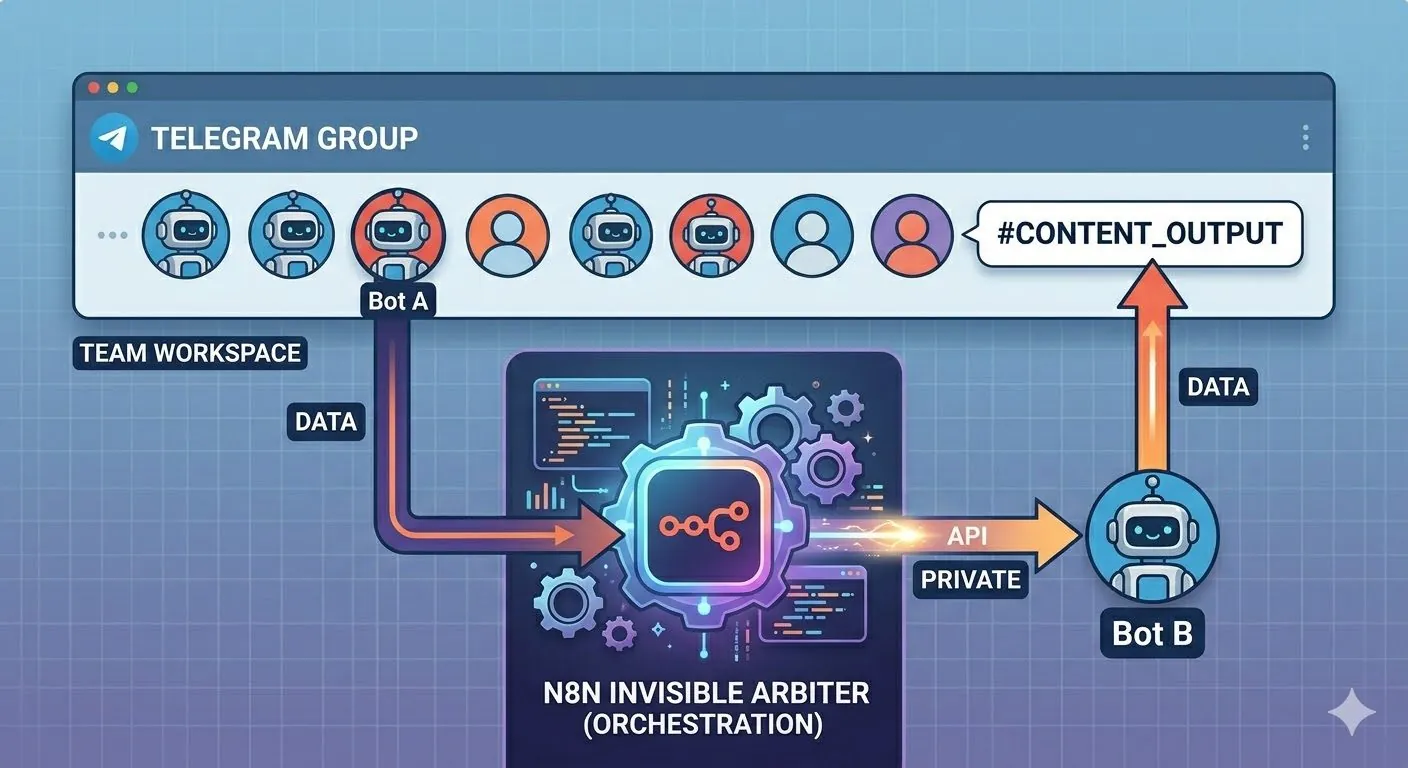
This hybrid approach gives you the visual transparency of a Telegram group with the strict execution control of a low-code automation platform. It prevents infinite loops entirely because the communication is directional, not conversational.
By mastering these Telegram mechanics, you transform your chat app from a simple messenger into a practical multi-agent operating system.
And yes, this means spending a cheerful Saturday evening debugging mention behaviour while pretending it is “light maintenance.”
Ian Xie
April 05, 2026
ian.us.ci