
Orchestrating Agents on Telegram
Orchestrating Agents on Telegram
"Everyone wants seamless orchestration until they meet their first loop at 1:13 a.m."
— British automation folklore
Stop treating your AI agents like isolated chatbots. It’s time to orchestrate them. 🧠🕸️
If you’re building with OpenClaw on Telegram and you aren't using session handoffs, you’re missing out on its most powerful feature: continuity.
Imagine your "Research Bot" doing a deep dive, realizing it needs a script, and autonomously passing the baton—and all the context—to your "Coding Bot." Or starting a complex deployment on your phone during your commute and seamlessly resuming it on your terminal at home.
No copy-pasting. No starting from scratch. Just true, seamless agent orchestration.
Here is your masterclass on configuring OpenClaw’s session handoff toolkit. Bookmark this. 📌
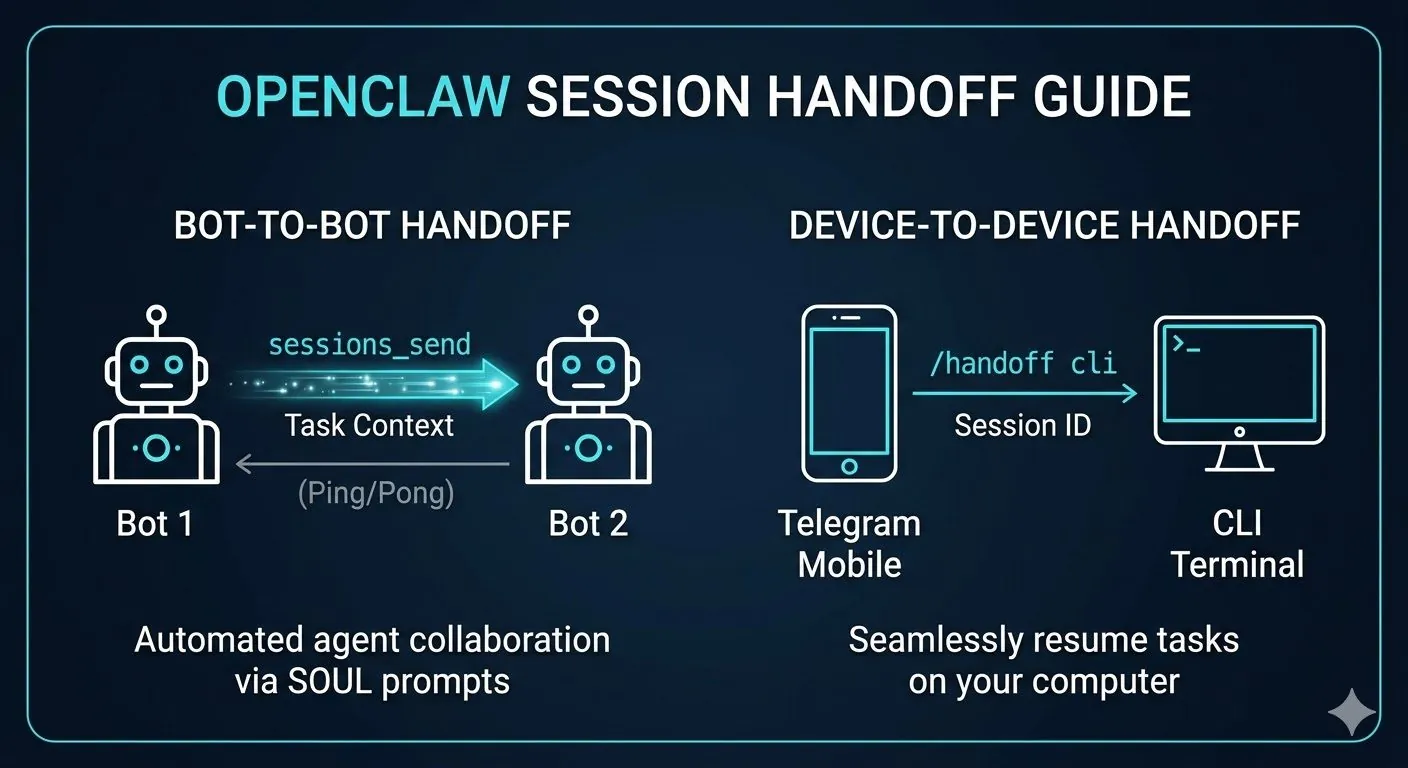
1. The Hive-Mind Protocol: sessions_send 🤖➡️🤖
This isn't a command you type. This is how your agents talk to each other. When an agent hits the edge of its capabilities, it uses the built-in sessions_send tool to inject its context directly into another agent's active session.
Obviously, everything went perfectly according to plan the first time. This sentence remains fiction but it is well formatted fiction.
Under the Hood (The Parameters):
-
label/agentId: The target agent (e.g.,label="coder"). -
message: The task brief and the context summary. -
timeoutSeconds: Set to default to ping-pong ideas back and forth, or drop it to0for a "fire-and-forget" asynchronous handoff.
How to Engineer It: You wire this up via your agents' system prompts (SOUL.md).
Prompt Engineering Hack: `"If the user asks a question about infrastructure, summarize our conversation and use the 'sessions_send' tool to hand off the task to @DevOpsBot."*
⚠️ Crucial Architecture Note: Agents are siloed by default. To make this work, you must go into your openclaw.json and set "visibility": "all" under your sessions config. If you don't do this, they can't see each other!
2. The Anti-Amnesia Command: /telegram-context fetch 🧠
Ever had an agent take over a thread and immediately act like it has no idea what’s going on? If you have the telegram-context skill installed, you can force the new agent to "read the room."
How it works: Drop this command into your chat: /telegram-context fetch 30
The Result: The bot silently scrapes the last 30 messages, summarizes the state of the project, and is instantly caught up. Pro-tip: Keep it between 10-30 to save on token costs, but bump it to 50 if you're handing off a massive, complex architecture mapping.
3. The Commuter’s Dream: /handoff 📱➡️💻
Sometimes the handoff isn't between bots; it’s between your devices.
How to execute a seamless environment shift:
-
On Mobile (Telegram): Type
/handoff cli. The bot pauses the session, saves the active state, and spits out a Session ID (e.g.,abc1234). -
On Desktop (Terminal): Open your CLI and run:
openclaw resume abc1234
Boom. Your local CLI agent boots up, inheriting the exact workspace, context, and chat history. You pick up the exact millisecond you left off.
🏗️ Architecture Best Practices
-
Deploy in Telegram Topics: The absolute cleanest way to manage a multi-agent swarm is inside a Telegram Supergroup with "Topics" enabled. Build a "General" topic, a "DevOps" topic, etc. When your agents use
sessions_send, they can route their outputs directly to the correct thread. -
Hard Boundaries: A bot is only as good as its constraints. Your system prompts need strict boundaries. Your Research Bot needs to know exactly what it cannot do, so it knows precisely when to trigger an escalation.
Check out the full OpenClaw Telegram Topics tutorial on YouTube if you want to see the visual setup for this.
Want to steal my exact prompt framework for this? Drop a 🤖 in the comments or reply to this post, and I’ll send you my custom SOUL.md template for flawless agent handoffs!
Ian Xie
April 04, 2026
ian.us.ci